
Desk reset in about 8 minutes
FairPlay Login Password — Quick Fix for a Lost or Locked Code So You Bet Again in 8 Minutes
Sort out a FairPlay login password that is forgotten, refused or locked without burning tries on guesses. The desk resets one in about 8 minutes, a new string has to be 8 to 14 characters with a letter and a number, and the fourth wrong entry costs a 20-minute wait. Pick your case below.
Swap a FairPlay Login Password in One Quick Pass: Old Code Out, 8 to 14 Characters In
This is what the FairPlay change screen asks for, whether it appears by force on day one or you open it yourself later. Three boxes. The middle one is where people slip.
- 8 characters at least
- 14 characters at most
- one letter or more
- one number or more
First FairPlay Sign-In Forces a New Password: Easy Steps and Strings That Pass
A new FairPlay ID arrives on chat with two things: a User ID and a starter password that somebody at the desk typed. That starter is good for exactly one sign-in. The moment it is accepted, FairPlay puts a change screen in front of you and nothing else opens until a new password is saved, so the lobby, the balance and the bet slip all sit behind that one form.
People read this as an error. It is not.
What trips them is the old-password box. On the forced screen, "old" means the starter from the desk, the same string typed a few seconds earlier, and not some earlier password from another site. If you have no ID at all yet, the FairPlay sign up with four details on chat comes first and takes about 5 minutes; the password step on this page starts after that.
- Field one of the FairPlay form takes the User ID. Copy it across from the chat one character at a time.
- Type the starter password in the password field. On a phone or browser FairPlay has not seen before, a one-time code is asked for as the third field.
- Wait for the change screen. It loads by itself after the sign-in is accepted.
- Put the starter password in the old-password box once more.
- Type your own password in the new-password box: 8 to 14 characters, at least one letter, at least one number.
- Save. The lobby opens, and from the next visit only the new password works on that FairPlay ID.
FairPlay Login Password Rule: Real Strings That Pass and Fail
The FairPlay rule has three parts and the form checks all of them on save. Length is counted in characters, so count on your fingers if you must. Eight examples, all cricket words because those are what people pick:
| String typed | Length | Result | Reason |
|---|---|---|---|
| yorker88 | 8 | Passes | Sits right on the floor of eight, letters and digits both present |
| Sixer2026 | 9 | Passes | Inside the range with both kinds of character |
| Eden2Gardens | 12 | Passes | One digit in the middle is enough |
| midwicket4runs | 14 | Passes | Exactly on the ceiling of fourteen |
| kohli18 | 7 | Fails | One character short |
| wankhede | 8 | Fails | Long enough, but no number anywhere |
| 9876543210 | 10 | Fails | A mobile number has no letter in it |
| finalover6balls | 15 | Fails | One character over the limit |
Two of those failures are worth a second look. The mobile number is the most tempting choice on any FairPlay account because it is already in your head, and it fails for a reason that is easy to miss: ten digits, zero letters. And finalover6balls looks fine until you count it. Fifteen.
After the Forced Change: a Quick FairPlay Sign-In Test
Do one thing before you start browsing markets. Sign out, then sign straight back in with the new password. It takes about 30 seconds across the three fields (the FairPlay Pro login fields and their order are laid out on their own page) and it tells you right away whether the string in your head matches the string FairPlay saved. Finding a typo now, with the starter chat still open on your phone, is far cheaper then finding it on a match night.
Lost FairPlay Login Password: One Complete Chat Message and a Fast 8-Minute Turnaround
Guessing is the expensive option. Every miss moves a FairPlay ID one step nearer the four-try lock, and a blank memory rarely improves on the third attempt. The cheaper option is the chat with the FairPlay desk that issued the ID: they match you to the account and post a fresh string in the same thread. About 8 minutes from a complete first message. The word "complete" is doing the work in that sentence, because a request that says only "password not working" turns into a back-and-forth of questions, and every question adds a couple of minutes.
So send everything at once.
What a Verified FairPlay Login Password Reset Needs From You
- Your name
- The name given when the FairPlay ID was opened, spelled the same way. A nickname slows the match.
- User ID
- The ID itself, not the mobile number, unless the mobile number is what you sign in with. If you have forgotten both, say so plainly in the message.
- The problem
- One line is enough: forgotten password, reset needed. Add whether the account is also locked, since that changes what happens next.
- A screenshot
- The sign-in form showing the refusal. It proves which FairPlay address you were on and what the form actually said.
Those four items are the same set the desk asks for on any problem; the full list of ways to reach it, and the hours, are on the reaching the FairPlay customer care number desk page. One thing never goes in the message: a guess at the old password. Nobody at the desk needs it and it helps nothing.
- Pick up the phone whose number sits on the FairPlay ID, so the request and the account match without a single question.
- Send one message holding all four items: name, User ID, the line about the forgotten password, and the screenshot.
- Wait for the first reply, which usually lands in about 2 minutes, and answer anything the desk asks.
- Around minute eight the FairPlay desk posts a fresh string in the thread. Type it by hand instead of pasting, so no stray space comes along.
- Sign in on FairPlay with the User ID and that fresh password, plus the one-time code if the device is new.
- Replace the fresh password with your own string of 8 to 14 characters that carries a letter and a number.
Step six matters more than it looks. A password that was typed out in a chat window is, for practical purposes, a second starter password. In practice expect FairPlay to put the change screen up again, the way it does on a brand-new ID. If it does not, don't leave it; open the account area and change it yourself, which the section further down covers.
- 8 min desk reset, roughly
- 2 min first reply
- 4 items in one message
- 24x7 desk hours
FairPlay Login Password Reset Timing: a Real Evening, Minute by Minute
Here is how those figures line up on a clock. The times are illustrative and rounded, built only from the usual pace of the FairPlay desk.
7:02 pm The password is refused twice. You stop there, take a screenshot and send the four items to the FairPlay desk.
7:04 pm First reply. The desk confirms the name against the User ID.
7:10 pm A fresh password arrives on the chat, about eight minutes after the request.
7:11 pm Signed in. Three fields, around 30 seconds.
7:12 pm New password of your own saved, and the lobby is open.
Ten minutes, give or take, from a refused form to an open FairPlay lobby. Compare that with the other way this evening can go: a person at the toss of a T20 types a third version of the old password, then a fourth, and the account locks for twenty minutes. They message the desk anyway, get the reset, and still have to sit out the rest of the lock before the new password can be used. Same problem, twice the wait. The only difference was stopping at two.
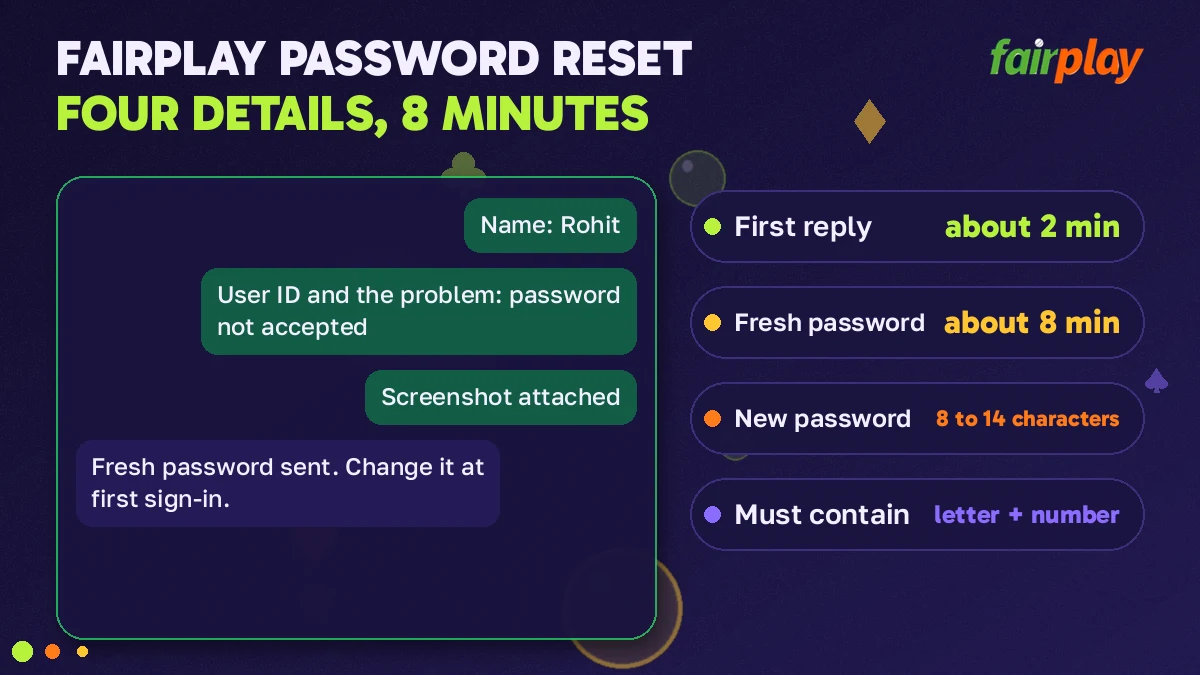
Locked After 4 Wrong Tries: the Safe Way Through the FairPlay 20-Minute Wait
FairPlay counts wrong passwords. Four in a row and the sign-in form stops accepting anything on that ID for 20 minutes, right password or not. The lock is a timer, nothing more: it starts on the fourth miss and it ends by itself. There is no form to fill and nobody to persuade.
That last point is the one people find hard to believe, so again in other words: you do not have to do anything to end a FairPlay lock except let twenty minutes pass.
| Wrong tries so far | State of the FairPlay ID | Best move |
|---|---|---|
| 1 | Open | Retype slowly. Check caps lock and the keyboard language. |
| 2 | Open | Two misses is the signal. Send the four reset items to the FairPlay desk instead of typing a third version. |
| 3 | Open, one miss left | Do not use the last try on a guess. Reset through the desk. |
| 4 | Locked for 20 minutes | Note the time, put the phone down, request a reset if the password is unknown. |
What Not to Do While a FairPlay Login Password Lock Is Live
- Keep typing. Whether extra attempts during the lock restart the 20 minutes is not something the FairPlay desk spells out, and that is reason enough not to test it. Leave the form alone.
- Switch to another address. One FairPlay ID carries one balance across every working address, which means the lock belongs to the ID and not to the web address you happened to be on. A different mirror will most likely show the same refusal.
- Ask for a second ID. The desk opens one FairPlay ID per mobile number. A new request from the same number goes nowhere, and your balance is on the locked ID anyway.
- Reinstall the app. The lock sits on the account, not inside the 19 MB APK. Deleting and installing it again costs five taps and changes nothing.
Two Clocks at Once: a Quick FairPlay Lock and Reset Example
If you know the password and simply mistyped it four times, the 20-minute wait is the whole job. The harder case is the locked account where the password is also forgotten. Then two clocks run together, and the longer one decides when you are back.
9:15 pm Fourth wrong try. FairPlay locks the ID until about 9:35.
9:16 pm Reset request sent to the desk with the four items and a note that the account is locked.
9:24 pm Fresh password arrives. The lock still has eleven minutes to run.
9:35 pm Lock ends. Sign in with the fresh password, carefully, once.
A reset hands you a new password. The desk does not say that it also cuts the lock short, so plan on waiting out both and treat anything faster as a bonus. Asking during the lock, rather than after it, is what saves the eight minutes. When 9:35 comes, type the fresh password one character at a time; a fifth miss at that point would be a miserable way to start a second wait.
FairPlay Password Change Without the Desk: the Quick Fourth Item in Your Account Area
A chat with the desk is not the only place a FairPlay password can be replaced. Inside the account area sits an entry labelled change password, fourth in a short list, and it does in under a minute what the chat takes eight to do. One condition: the current password must still be in your head. What each of the other four shows is covered on the My FairPlay Pro and its five account items page.
Why bother? A fresh one from the desk that never got replaced, mostly (though some people change theirs at the start of every IPL season, which is as good a reminder as any).
- Sign in on FairPlay with the current password.
- Open the account area and choose change password.
- Type the current password in the old-password box.
- Type the new one: 8 to 14 characters with a letter and a number. Count it.
- Save. Then prove it: leave the FairPlay lobby and come back in with the new string, a 30-second check.
That is the whole thing. No chat, no waiting, and the the 8 minutes of a desk reset never come into it. The catch is step three: a wrong entry in the old-password box blocks the save, and it's reasonable to assume repeated misses there are counted the same way misses on the sign-in form are. If you are not certain of the current password, do not experiment inside the account area. Go to the desk.
New FairPlay Login Password Not Accepted? Easy Checks by Symptom
The form refuses on save. Count the characters. Seven fails, fifteen fails, and the refusal may not tell you which side of the range you missed.
Length is fine, still refused. Look for the missing kind. All letters or all digits both fail the FairPlay rule, however long the string is.
It saved, but sign-in now fails. A pasted password can carry a trailing space from the chat. Type it by hand. Stop at two misses and ask for a reset.
The password is right and a third box appears. That is the one-time code FairPlay asks for on a new device, and it has nothing to do with the password being wrong.
The sign-in form will not load at all. Then the password is not the problem. Some addresses people type do not lead to FairPlay; the FairPlay Pro in login address check shows which ones answered when tested.
Hard to say which of these is most common, its probably the first. A password typed on a phone keyboard with the characters hidden is easy to miscount by one, and the rule is strict at both ends: eight is in and seven is out, fourteen is in and fifteen is out.
Verified FairPlay Pages to Open When the Login Password Was Not the Fault
A password is one of three sign-in fields, and the fields around it have pages of their own on this FairPlay desk. If the fix above did not match what your screen shows, one of these probably will.
Quick FairPlay Login Password Searches People Type
- fairplay login password
- fairplay login password reset
- fairplay forgot password
- fairplay password change
- fair play login password
- fairplay pro login password
- fairplay id password reset
- fairplaypro password rule
FairPlay Login Password Reset, Rule and Lock: Fast Answers in One Place
- As a fairplay login password, yorker88 is accepted and kohli18 is not: eight characters against seven.
- Day one on a FairPlay ID ends at the change screen, not the lobby, until your own string of 8 to 14 characters is saved.
- Request a fairplay login password reset at 7:02 pm, in the worked example above, and the fresh string shows up near 7:10.
- Four wrong entries in a row lock the FairPlay ID for 20 minutes; the lock ends by itself.
How the FairPlay Login Password Reset Stays Quick
Searches for fairplay login password and fairplay login password reset nearly always come from one of three people: someone holding a brand-new FairPlay ID who has just met the forced change screen, someone who has forgotten what they set months ago, and someone staring at a locked form after a run of bad guesses. The first needs no help from anyone, only a string that fits the 8 to 14 rule. The second needs the desk, and the request moves fastest when the name, the User ID, a one-line description and a screenshot go out in a single message.
The third person mostly needs patience. A FairPlay lock after 4 wrong tries is a 20-minute timer, and a reset asked for during that window is ready by the time the timer runs out. People who also type fair play login password or fairplay pro login password are asking about the same form and the same rule, since one FairPlay ID and one password work on every address the brand keeps. Anyone who still knows the current password can skip the desk entirely and use the change password item inside the account area.
FairPlay Login Password Questions With Real Answers
How do I reset a forgotten FairPlay login password?
Message the FairPlay desk on chat and ask for a reset, which takes about 8 minutes. Send your name, User ID, a line saying the password is forgotten and a screenshot of the refused sign-in. A fresh password comes back on the same chat, and you then replace it with your own string of 8 to 14 characters.
Is the change screen after my first FairPlay login an error?
No, that screen is meant to be there. The starter string that arrived on chat with the new FairPlay ID is good for one sign-in, so the form stops you before the lobby and wants a replacement. Put the starter in the old-password box, choose something like Sixer2026 as the new one, save, and the screen does not return.
What is the FairPlay login password rule?
A FairPlay password must be 8 to 14 characters long and contain at least one letter and one number. So yorker88 passes at eight characters and midwicket4runs passes at fourteen, while kohli18 is one short and a bare mobile number fails for having no letter. Count the characters before you save.
How long does a FairPlay account stay locked after wrong passwords?
The lock lasts 20 minutes and starts on the fourth wrong password in a row. Nothing has to be sent to lift it, because it ends by itself. Stop typing, note the time, and if the password is truly forgotten use the wait to request a desk reset, which takes roughly 8 minutes.
Can I change my FairPlay login password myself?
Yes, as long as you still know the current one. Sign in, open the My FairPlay account area and pick change password, one of its five items. Type the old password, then a new one of 8 to 14 characters with a letter and a number, and save. No message to the desk is needed.
Can I get a FairPlay login password reset without the registered mobile number?
Possibly, but it is the desk that decides and it will be slower than the usual 8 minutes. Every FairPlay ID sits on one mobile number, so a request from a different number gives the desk less to match. Say in the first message that the SIM is gone, and add your name, User ID and a screenshot.
Why is my new FairPlay password not accepted?
Check the length and the mix first. Fewer than 8 or more than 14 characters fails, and so does a string made only of letters or only of digits. If the count is right, retype the old password slowly, since a wrong entry in the old-password box also stops the new one from saving.