
19 MB · Android 8.0+ · free file
FairPlay Pro App Download — Free 19 MB APK to Install on Android and Bet From Your Phone
Put FairPlay on your phone and place bets without typing an address every time. The FairPlay Pro app download is a free 19 MB APK for Android 8.0 or newer, installed in five taps. iPhone users pin a Safari shortcut instead, and both routes open one account with one balance.
FairPlay App Login Card: Quick Entry by Mobile Number and Device
Holding an ID already? Skip the reading. Give the mobile number tied to your FairPlay account, name the phone you are installing on, and go straight to the sign-in.
On an iPhone the device line reads Safari shortcut. Those four steps sit further down this page.
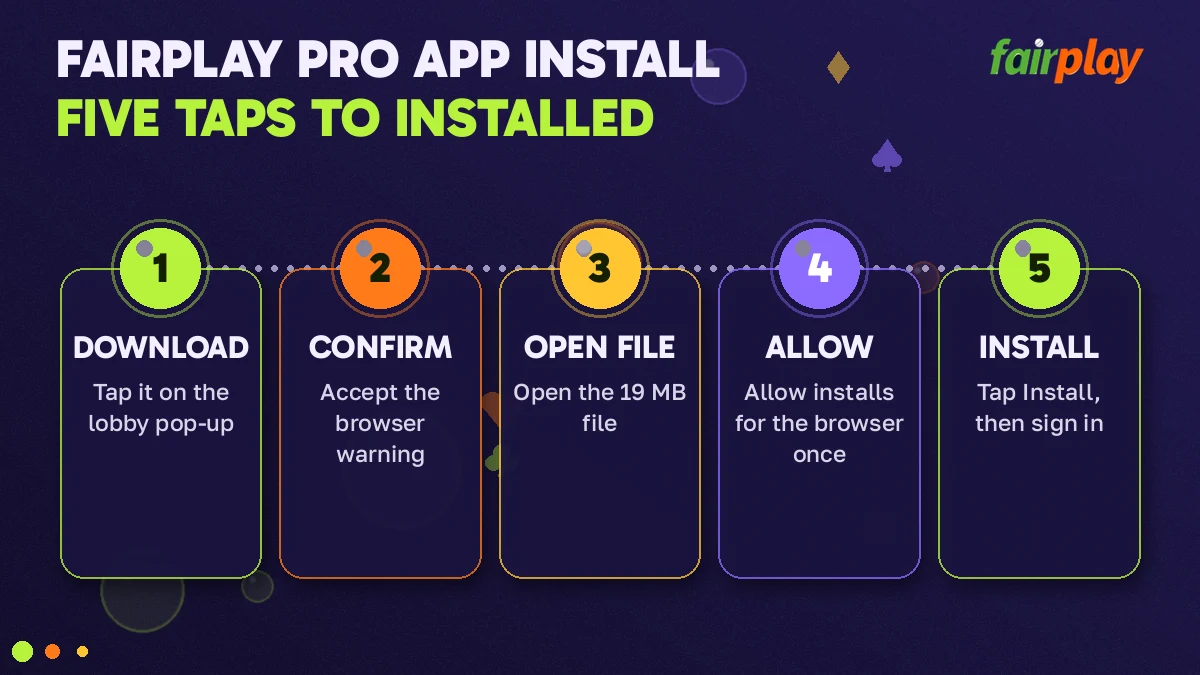
FairPlay APK Download in 5 Easy Taps, Named One by One
Nineteen megabytes. That is the whole download, small enough to come down on mobile data while the toss is still being argued about. Size is never what trips people up. What does is a single Android permission in the middle of the install, which looks like a warning and is really just a switch.
Because the FairPlay APK does not come from Google Play, your phone treats it like any other file a browser hands over: it asks before installing. You answer that question once per browser. After that, every later FairPlay file goes through without the the detour.
Below are the five taps in the order your screen shows them. Count along if you like.
- Tap Download on the APK pop-up. Open the FairPlay lobby in Chrome. A pop-up offering the app appears on first load; on the fairplaypro.com home screen for FairPlay it closes with the X at top right, so do not dismiss it out of habit. One tap on its download button requests the file.
- Tap Download anyway. Two choices appear in a strip: Cancel on one side, Download anyway on the other. Chrome shows that strip for anything ending in .apk, whoever made it. Pick the second choice. Since the FairPlay file is only 19 MB, the bar in the notification shade rarely hangs around for long.
- Tap Open on the finished download. When the bar completes, tap Open in the strip at the bottom of Chrome, or tap the notification. Nothing installs yet. Android replies with a box saying your browser is not allowed to install unknown apps.
- Allow the install for your browser, once. The box carries a Settings link that drops you on one switch, labelled Allow from this source. Turn it on and press back. Strictly that is a link and a switch, I know; the count of five treats the permission as one step, and the back press is a gesture.
- Tap Install. Android now shows the FairPlay icon, the app name and an Install button. Tap it. A short bar runs, the word Installed appears, and two choices follow: Done or Open. Choosing Open starts the app, which is use and not setup, so the count stops here.
- 19 MB size of the FairPlay file
- 8.0+ Android version needed
- 5 taps download to Installed
- Free no charge for the APK
What the five taps do not include is an account. The app is a way in; the ID behind it is opened separately on the WhatsApp desk, in about 5 minutes, and the FairPlay ID page covers that request.
FairPlay App Download APK Checks: Real File Size, Android 8.0 and Updates
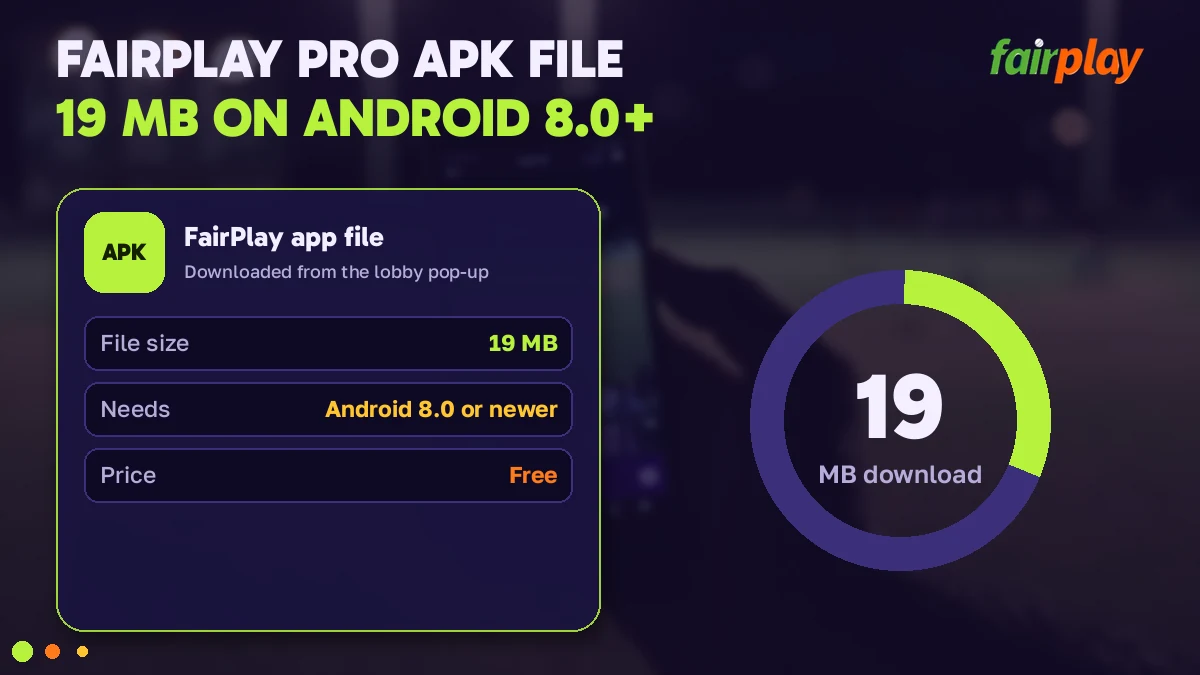
Two numbers decide whether the install works first time: 19 and 8.0. Check both before tapping anything and most of the error messages further down never appear. It takes less time then reading this paragraph, roughly.
- File type
- APK, a single file, installed by hand
- Size when complete
- 19 MB in the Downloads folder
- Android needed
- 8.0 or newer
- Taps to install
- 5, one of them a browser permission
- Store listing
- None on Google Play, none on the App Store
- Price
- Free; a FairPlay ID is funded separately
FairPlay APK size check: the real 19 MB figure
Open the Files app (or whatever your phone maker calls its file manager), go to Downloads and long-press the FairPlay file. Details shows a size. Nineteen megabytes means the transfer finished. Anything clearly smaller means the download was cut, usually when the phone hopped between Wi-Fi and mobile data, and that half-file is exactly what produces a parse error later. Delete it. Download again. Trying to install a short file on the off chance only wastes a minute.
The opposite case is rarer. A file calling itself FairPlay and weighing far more than 19 MB is probably not this build at all, so leave it alone.
Android 8.0 check for a safe FairPlay install
Settings, About phone, Android version. Some makers tuck it one level deeper under Software information. You want 8.0 or higher. Most handsets in daily use clear that bar, but a hand-me-down kept in a drawer for match days might not, and on it the FairPlay APK simply refuses to open. No setting fixes that. The browser still works on such a phone, though: load the lobby in Chrome and use the FairPlay Pro login form there, same ID, same password.
Easy FairPlay app update: new file over the old
There is no update button in a store, because there is no store. Updating means downloading the current FairPlay APK and installing it on top of the copy you already have. Same taps as before, minus the permission if you stay with the same browser. Android recognises the app, asks whether you want to update the existing one, and swaps the files in place.
Your account is untouched by any of this. Nothing about a FairPlay ID is stored inside the APK: balance, open bets and statement sit on the server and reappear under My FairPlay Pro the moment you sign back in. When should you update? When the lobby pop-up puts a newer file in front of you and your installed copy is misbehaving. Not on a schedule.
FairPlay App Not Installed? Quick Fixes Sorted by Error Message
Android is terse. It gives you four or five words and no reason. The table reads each message for the FairPlay file specifically and says what to tap next; the longer notes under it cover the three that come up most.
| Message on screen | Usual cause | What to tap |
|---|---|---|
| App not installed | Signing key clash with a FairPlay icon already present; less often, no space | Uninstall the old icon, free some space, Install again |
| There was a problem parsing the package | Android older than 8.0, or a download that was cut short | Check the version, check for 19 MB, download again |
| Unsafe app blocked (Play Protect) | The file did not come from Google Play, so the developer is unknown to it | More details, then Install anyway |
| The unknown-apps box returns after every Open | Tap 4 was skipped, or done for another browser | Settings link in that box, switch on, back |
| Cannot open file | The APK was opened from a chat or a viewer app | Open it from Downloads in the file manager |
App not installed: quick FairPlay fix
Two causes cover nearly every case. First, an older FairPlay copy from some other source is still on the phone. Android will not let a file signed with one key replace an app signed with another, and this unhelpful line is how it says so. Press and hold the old icon, choose Uninstall, then install the 19 MB FairPlay file fresh. Second, storage: an app needs more room than it's download because the file unpacks, so a phone with next to nothing free fails right at the end of the bar.
Parse error on the FairPlay APK: fast check
On the FairPlay file this message has two explanations, and the two checks higher up this page test both of them. Version line below 8.0? Stop there; that phone keeps to the browser. Version fine? Then the FairPlay download stopped short of 19 MB, so bin it and pull the FairPlay APK again without changing networks midway.
Play Protect prompt: safe taps for the FairPlay file
Play Protect scans whatever is installed outside Google Play, and for the FairPlay APK it may show a box headed Unsafe app blocked. The large button only closes that box. To carry on, tap More details and then Install anyway. Should it offer to scan the FairPlay app first, let it; the Install button returns after the scan.
A pattern that repeats often enough to mention: someone downloads the file onto an old spare handset, gets the parse message, downloads again, gets it again, and sends the desk a screenshot after the third try. The phone was on Android 7. A ten-second look at the version line would have settled it before the first download, which is why that check sits above this section and not below it.
One more, since it confuses people. An install that reaches Installed but opens to a blank lobby is not an install error at all. The FairPlay app needs the network like the website does, so switch data on and reopen it.
Message not in the table? Screenshot it before you tap anything else. The exact wording on your screen is worth more than a description from memory, and FairPlay customer care usually sends a first reply in about 2 minutes, at any hour.
FairPlay App Login: Fast Sign-In After the Install Finishes
Open the app and the first thing on screen is the lobby, not a form. LOGIN sits in the header at top right, after the menu icon, the logo and the search. Tap it.
Three fields follow, the same three the website asks for: User ID or mobile number, password, and a one-time code when the device is new to your account. A freshly installed FairPlay app probably counts as a new device, so expect that code on the first app sign-in even if your browser stopped asking for one long ago. About 30 seconds, start to finish. What each error under the form means is explained field by field on the FairPlay app login and web sign-in page, and it applies to both.
First time on a brand new ID? The FairPlay app stops you and demands a new password before anything else, 8 to 14 characters with a letter and a number. Four wrong tries lock the ID for 20 minutes, in the app exactly as in the browser, so do not guess; the FairPlay login password page explains the desk reset.
Once you are in, the app is the lobby you already know. Four sport tabs run across the top, the casino rows sit underneath (all seven are listed on FairPlay games), and the bottom bar holds Our Casino, Popular Events, Inplay and Sportsbook.
Why bother with an app when the site does the same job? Mostly for in-play cricket. A price shifts between overs, and finding the right browser tab again costs you the moment, whereas an icon on the home screen is one tap. That is the whole argument for the FairPlay app, and for plenty of people it is enough. The markets themselves, match odds through to session, are laid out on FairPlay cricket.
FairPlay Application on iPhone: the Safe Safari Shortcut Route
Search the App Store for FairPlay and nothing belonging to this lobby comes back. The 19 MB file from the sections above is no help either, since it is built for Android alone. So on an iPhone the FairPlay route skips downloading altogether.
What you get instead is a home-screen shortcut, which in daily use behaves very much like an app icon.
- Open Safari and load the FairPlay lobby. Which address is answering right now is tracked on the FairPlay Pro com page.
- With the FairPlay lobby on screen, touch Share in the Safari toolbar. It is the second of the four steps here and the only one people hunt for.
- Pick Add to Home Screen from the sheet that slides up (it can hide below the first row of icons), and trim the label down to FairPlay.
- Tap Add. An icon lands on your home screen next to everything else.
From there one tap opens the lobby, and LOGIN is where it always is. Sign in and you are looking at the balance your Android phone shows, because both are windows onto a single FairPlay ID. One account. Two doors.
| Point | Android APK | iPhone shortcut |
|---|---|---|
| What lands on the phone | A 19 MB app | An icon pointing at the lobby |
| Requirement | Android 8.0 or newer | Safari |
| Setup | 5 taps | Share, Add to Home Screen, Add |
| Updates | New file over the old | Nothing to update |
| Store listing | Not on Google Play | Not on the App Store |
Can the two sit side by side? Yes. Plenty of people keep the FairPlay APK on an Android handset and the Safari icon on an iPhone, signed in to one FairPlay ID on both. Expect the one-time code the first time the second device signs in, and after that the FairPlay balance and open bets match on either screen.
FairPlay Download Searches for the Free App
- fairplay pro app download
- fairplay app download
- fairplay apk download
- fairplay apk
- fairplay app
- fairplay application
- fairplay download
- fairplay betting app
- fairplay app login
- fairplay online app
- fairplay app download apk
- fairplay download apk
FairPlay Betting App Facts: Official File, Version and Route
- FairPlay Pro app download
- The FairPlay Pro app download is a free Android file of 19 MB. A plain FairPlay app download search lands on that same file.
- FairPlay APK and FairPlay APK download
- The FairPlay APK is a single file, and a FairPlay APK download is complete only when the file manager reads 19 MB.
- FairPlay app download APK, FairPlay download APK
- Both wordings end at the five taps listed earlier, browser permission included.
- FairPlay app APK
- A FairPlay app APK opens on Android 8.0 or newer; older phones stay with the browser.
- FairPlay betting app, FairPlay online app
- As a FairPlay betting app it carries the sports exchange and the casino rows. As a FairPlay online app it needs a connection, since nothing in it runs offline.
- FairPlay app login
- FairPlay app login uses three fields and takes about 30 seconds.
People also type FairPlay application, FairPlay app or just FairPlay download when they mean the same request, and the answer does not change with the wording: one free file for Android, installed by hand, updated by placing the new file over the old.
FairPlay download APK on iPhone: the easy shortcut answer
No such file exists for iOS. The FairPlay route on an iPhone is a Safari home-screen shortcut, and it signs in to the ID your Android copy uses. Three taps make it:
- Share
- Add to Home Screen
- Add
FairPlay Online App: Best Pages to Open Next
With the app installed, these five FairPlay pages cover what happens after the icon is on your screen.
- FairPlay Pro Login Fields
- My FairPlay Pro After App Sign-In
- FairPlay Games Rows
- FairPlay Cricket Markets
- FairPlay Pro Com Lobby With the APK Pop-Up
FairPlay Pro App Download Questions With Quick Answers
How do I download the FairPlay APK on an Android phone?
Five taps do it. Tap the download button on the pop-up that the FairPlay lobby shows on first load, confirm the browser warning, open the finished file, allow installs for that browser once, then tap Install. The file is 19 MB and needs Android 8.0 or newer, so check both before you start.
Is the FairPlay app available on the Google Play Store?
No. Google Play carries no FairPlay listing, which is exactly why the Android build arrives as a 19 MB APK and why tap 4 of the five asks you to allow installs from your browser once. Treat any Play Store listing that uses the name as a different product from this file.
Does FairPlay have an iPhone app on the App Store?
No, FairPlay has no App Store listing, so there is nothing to download on an iPhone. Open the lobby address in Safari, tap Share, choose Add to Home Screen and confirm with Add. That leaves an icon that opens the same lobby in one tap, and your Android and iPhone sessions share one ID and one balance.
Will the 19 MB FairPlay file run on my Android phone?
It will, provided the phone is on Android 8.0 or newer. Look under Settings, About phone, Android version before fetching the FairPlay file; a phone on anything older stops with a parse error however many times you retry. After the download, the file manager should also show 19 MB, not a smaller figure.
Why does the FairPlay app show App not installed?
That message nearly always means an older copy with a different signature is already on the phone, or storage ran out midway. Remove the old FairPlay icon first, clear some space, confirm the file reads 19 MB and tap Install again. Your ID and balance live on the server, so removing the app loses nothing.
Which details does the FairPlay app ask for at the first login?
Tap LOGIN in the app header and fill the same three fields as the website: User ID or mobile number, password, and usually a one-time code, since a fresh install tends to count as a new device. It takes about 30 seconds. A brand new ID must change the desk-issued password before the lobby opens.
How do I update the FairPlay app to the latest file?
Install the new file over the old one. Download the current FairPlay APK the same way as the first time, tap Install, and Android replaces the app in place. Do not remove the old copy first unless the phone reports App not installed, which points to a signature mismatch between the two files.
Is the FairPlay APK free to download?
Yes, free. Nothing is charged for the 19 MB Android file, the five-tap install or the Safari shortcut on an iPhone. The first rupee moves only when you fund a FairPlay ID, and that starts at ₹200. A request for money in exchange for the app itself does not come from the desk.